

Should You Migrate to Shopify's 2048 Variant Limit? What to Consider
Shopify increased its variant limit from 100 to 2048. Before you migrate from your current workaround, consider the effort, maintenance, SEO impact, and downstream effects. Is it worth it for your store?
Is Migrating to Shopify's 2048 Variant Limit Worth It?
Shopify's variant limit increased from 100 to 2048 variants per product in October 2025. But just because you can migrate doesn't mean you should. For new store owners or those with new product lines, creating new products with the expanded variant limit is straightforward. But most store owners set up one of these common workarounds to manage their products. In this case, migration requires careful consideration:
- Use a product options app like Infinite Options (easy)
- Split into different products with internal links (medium)
- Build different variant options using metafields and display it using custom code (medium)
- Merge products using similar URLs + lots of custom code (hard)
You have an established workflow and it can be hard to know where to even start to migrate.
In this blog post I'll outline the key considerations to help you decide whether migrating to Shopify's 2048 variant limit makes sense for your business.
Phase 1: Does Your Product Fit Within Shopify's 2048 Variant Limit?
Verify Your Products Work with 2048 Variants
The variant limit is 2048 now which should cover most stores’ needs. But if you are the type of company that offers a million varieties that customers can choose from, 2048 might not be enough for you. It's best to check that you can create your ideal product setup before going too far.
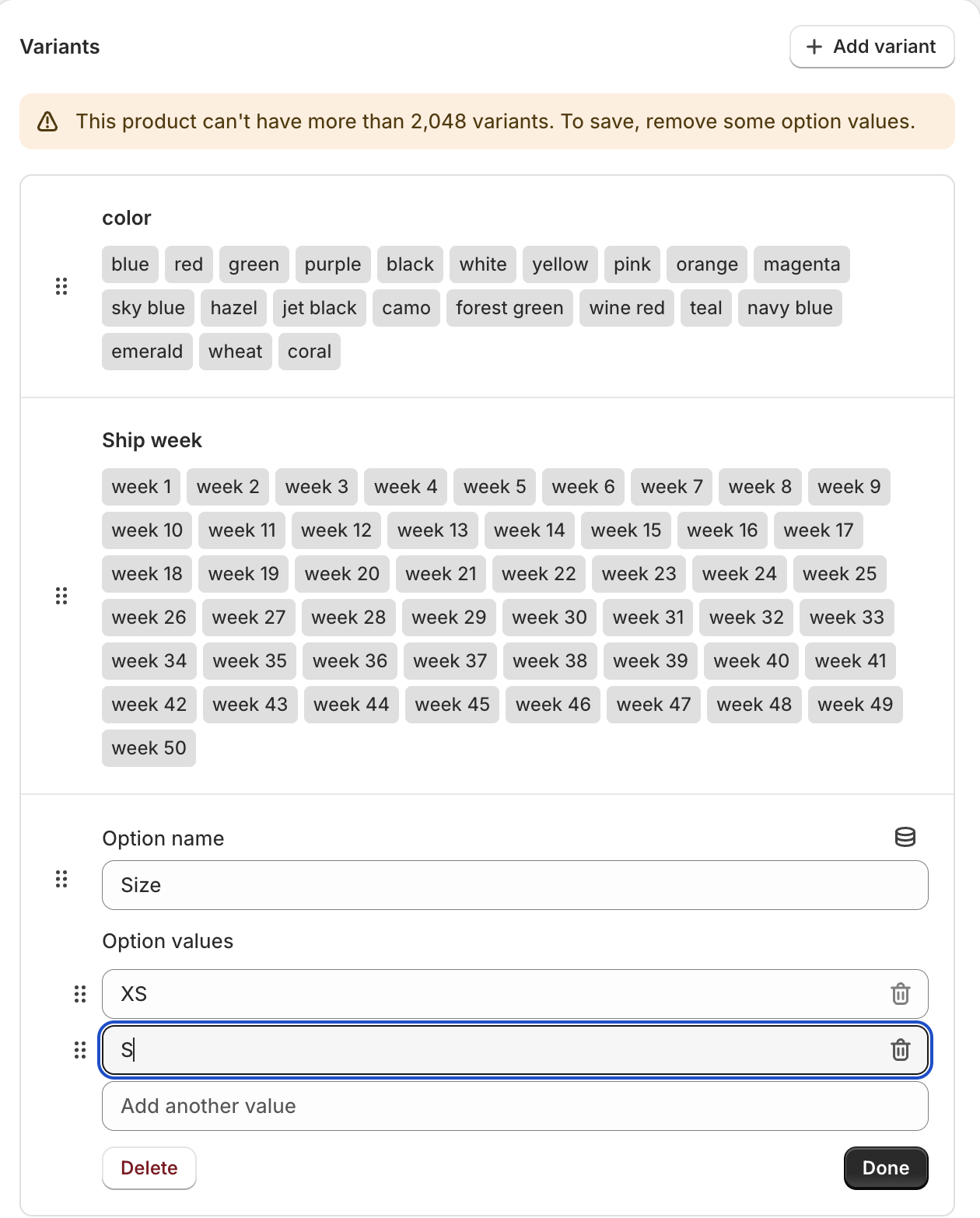
Limitations:
-
Note that you can still only create 3 variant options per product. That means if you have a shoe company and you want to offer size, color, style and pattern as separate options, that won’t be possible with the Shopify native solution.
-
Do you need to have multiple variant images? Shopify only allows 1 image per variant. There are coding workarounds to show multiple variants using variant image alt text (here’s an example from our client Casalina). It’s not a dealbreaker but it would add some work in your daily process.
Phase 2: Is Migrating from the 100 Variant Limit Worth the Effort?
1. Review how your daily workflow will change
Map between what you have right now and what you want your ideal product setup to look like. Most likely your products will have patterns in terms of what kind of options it offers. For example shirts might always have red, blue green and shoes will always have size 32-42.
For hacky solution #2 and #4, the data is all there in Shopify format - it’s just a matter of rearranging. For hacky solution #1 and #3 the data is also there but NOT in Shopify format and only in one location. That means you’ll be doing a lot of copying and pasting.
For the migration itself and your day to day tasks, it will be best to set up a bulk action workflow. This sounds fancy but I just mean that you’re going to need to be comfortable with using CSV/Excel and tools like Matrixify to add variants (here’s a tutorial from them).
For the migration, once you figure out how to structure, you can use something like chatGPT to move over and rearrange the data (with a good prompt of course, but that’s a topic for another day).
To put it lightly - there will be changes in your day to day workflow if you move to 2048 variants. You’ll need to weigh the pros and cons and consider if that effort is worth it for you.
2. How will your theme react?
If you used hacky solution #3 with metafields and you want to switch to variants, something will probably break in your theme. You or your developer need to consider what your theme needs to have during the migration. Maybe you will set up a default template or section with the variant-only version and the normal one you were using so you can have the in-between state at the same time.
Phase 3: What Changes When You Upgrade to 2048 Shopify Variants?
1. SEO Impact of Consolidating Products into Single Variants
I’m not a SEO person so I can’t tell you what is right but if you used hacky solution #2 or #4 there will be some kind of URL change because there will be one product instead of multiple. You’ll have to take 301 redirects into account.
Some brands purposely use solution #2 to be able to specifically link to a variant in ads or Google shopping.
You need to consider what kind of potential SEO changes there will be and if you’re ok with it.
2. Any changes in post-checkout flow?
If you used hacky solution #1 or #3 you most likely have line item properties to show the “variant” that the customer chose. Consider if anything in your fulfillment process needs these line item properties like the packing slip, your 3PL, Shopify flow, etc. You’ll need to adjust some code to fix this or inform your partners of the change.
If you have custom apps that utilize the older REST product API, then you might need to migrate them to the newer GraphQL product API because the REST APIs only support 100 variants.
3. Can your apps handle more than 100 variants?
At this point developers have had plenty of time to adapt their apps, but it’s still important to verify on your side that any apps you use that use product data can handle 2048 variants. This is especially important for storefront-facing apps in the following categories: complicated search/filter, subscription, bundles, personalization, reviews and returns.
4. How Shopify Variants Affect Your Collection Pages
If you used hacky solution #2 (splitting variants into different products) then the split products also show up individually on the collection page. If you migrate them to 1 product only, you will reduce visibility into those variants. This might not be a problem but some apparel brands especially want to highlight all the products they have so customers can easily filter to what they want.
When Migration to Shopify's 2048 Variant Limit Makes Sense
You should migrate if:
- You want to have granular inventory control per variant
- You want to see sales reports per variant
- Your current workaround is creating significant customer friction or confusion
- You're using paid apps solely to get around the 100 variant limit
- Your products naturally fit within 3 option types and 2048 total variants
- You have developer resources to handle the transition smoothly
- The SEO and merchandising changes won't negatively impact your business
Stick with your current setup if:
- You need more than 3 variant option types per product
- Migration would break critical integrations or apps
- You rely on the current URL structure for SEO or advertising
- The time and effort outweigh the benefits for your specific situation
Need Help Deciding?
Yeah, there's a lot that goes into evaluating whether Shopify's new variant limit is right for your store. Sound overwhelming? That's where we can come in to assess your specific setup and guide you through the decision.
Plentiful Commerce has worked with brands using all four of these hacky solutions. Book a call with us so we can talk through if a migration is right for your business.